
Two things I want you to try please:
I want you to please try going to http://bloodknights.kicks-ass.org
I also wouldn't mind it if you tried changing your realmlist.wtf to bloodknights.kicks-ass.org and logging in with:
Username: lol
Password: lol
If it doesn't work.. I have failed getting my server public.
Here is everything that might be the problem:
Ascent.conf
Realms.confCode:####################################################################### # ascent Configuration File # Last Update: : ascent.conf 2327 2007-11-14 15:24:51Z burlex $ ####################################################################### /******************************************************************************** * How to use this config file: * * Config files are in a block->variable->setting format. * * A < signifies the opening of a block, the block name is expected after that. * * After the block name, a space and then the settings sperated by = / ' '. * * * * e.g. * * <block setting="0" someval = "1"> * * * * Comments can be in C format, e.g. /* some stuff */, with a // at the start * * of the line, or in shell format (#). * ********************************************************************************/ #-#-#-#-#-#-#-#-#-#-#-#-#-#-#-#-#-#-#-#-#-#-#-#-#-#-#-#-#-#-#-#-#-#-#-#-#-#-#-#-#-#-#-#-#-#-#-#-#-#-#-#-#-# # Database Section # # Database.Host - The hostname that the database is located on # Database.Username - The username used for the mysql connection # Database.Password - The password used for the mysql connection # Database.Name - The database name # Database.Port - Port that MySQL listens on. Usually 3306. # Database.Type - Client to use. 1 = MySQL, 2 = PostgreSQL, 3 = Oracle 10g # #-#-#-#-#-#-#-#-#-#-#-#-#-#-#-#-#-#-#-#-#-#-#-#-#-#-#-#-#-#-#-#-#-#-#-#-#-#-#-#-#-#-#-#-#-#-#-#-#-#-#-#-#-# <WorldDatabase Hostname = "bloodknights.kicks-ass.org" Username = "root" Password = "root" Name = "norwegian" Port = "3306" Type = "1"> <CharacterDatabase Hostname = "localhost" Username = "root" Password = "root" Name = "accounts" Port = "3306" Type = "1"> #-#-#-#-#-#-#-#-#-#-#-#-#-#-#-#-#-#-#-#-#-#-#-#-#-#-#-#-#-#-#-#-#-#-#-#-#-#-#-#-#-#-#-#-#-#-#-#-#-#-#-#-#-# # Listen Config # # Host # This is the address that the server will listen on. # To listen on all addresses, set it to 0.0.0.0 # Default: 127.0.0.1 (localhost) # # WorldServerPort # This is the port that the world server listens on. # It has to be the same as what is specified in the # realms table in the LogonDatabase. # Default: 8129 # #-#-#-#-#-#-#-#-#-#-#-#-#-#-#-#-#-#-#-#-#-#-#-#-#-#-#-#-#-#-#-#-#-#-#-#-#-#-#-#-#-#-#-#-#-#-#-#-#-#-#-#-#-# <Listen Host = "0.0.0.0" WorldServerPort = "8129"> #-#-#-#-#-#-#-#-#-#-#-#-#-#-#-#-#-#-#-#-#-#-#-#-#-#-#-#-#-#-#-#-#-#-#-#-#-#-#-#-#-#-#-#-#-#-#-#-#-#-#-#-#-# # Log Level Setup # # Console Logging Level # This directive controls how much output the server will # display in it's console. Set to 0 for none, or -1 to disable. # -1 = Disabled; 0 = Minimum; 1 = Error; 2 = Detail; 3 = Full/Debug # Default: 3 # # World server packet logging feature # If this directive is turned on, a file called `world.log` # will be created in the server's directory and all packets # sent and received by clients will be dumped here in bfg # format. # Default: 0 # #-#-#-#-#-#-#-#-#-#-#-#-#-#-#-#-#-#-#-#-#-#-#-#-#-#-#-#-#-#-#-#-#-#-#-#-#-#-#-#-#-#-#-#-#-#-#-#-#-#-#-#-#-# <LogLevel Screen="0" File="-1" World="0"> #-#-#-#-#-#-#-#-#-#-#-#-#-#-#-#-#-#-#-#-#-#-#-#-#-#-#-#-#-#-#-#-#-#-#-#-#-#-#-#-#-#-#-#-#-#-#-#-#-#-#-#-#-# # Server Settings # # PlayerLimit # This directive controls the amount of sessions that will be # accepted by the server before it starts to add people to # the server queue. # Default: 100 # # Motd # This message will be displayed by the server in the chat # box every time any user logs on. Colors can be used in the # standard WoW format. # Default: "No MOTD specified # # Send Build On Join # This directive controls whether the server's internal revision # will be sent to clients upon entering the world. Use it to help # testers report bugs. # # Send Stats On Join # This directive controls whether the server will send the online player # count to a cilent when it enters the world. # # Breathing Setup # If the breathing code is causing problems or you want to run a fun server, you can disable # water checks by enabling this directive. # Default: 1 # # Level Cap # This variable controls the level that stats will be generated up to internally. # Beyond this level players can still see a higher level visually but their stats won't # increase beyond this point. # Default: 60 # # Expansion 1 Level Cap # This variable does the same thing as Level Cap above, except it applies to those who # have the first expansion: The Burning Crusade. # Default: 70 # # Seperate Channels Control # This directive controls whether horde and alliance chats will be seperated across channels. # Set to 1 for blizzlike seperated channels, or 0 to allow horde/alliance to speak to each other # across channels. # Default: 0 # # Compression Threshold # This directive controls the limit when update packets will be compressed using deflate. # For lower-bandwidth servers use a lower value at the cost of cpu time. # Default: 1000 # # Queue Update Rate # This directive controls how many milliseconds (ms) between the updates # that the queued players receieve telling them their position in the queue. # Default: 5000 (5 seconds). # # Kick AFK Players # Time in milliseconds (ms) that a player will be kicked after they go afk. # Default: 0 (disabled) # # Connection Timeout # This directive specifies the amount of seconds that the client will be disconnected # after if no ping packet is sent. It is advised to leave it at the default. # Default: 180 # # Realm Type # This is the realm type that will be used by the server to handle world pvp. # Default: 0 (pve)(RPPVE) # Other values: 1(pvp)(RPPVP) # # AdjustPriority # Set the server to high process priority? # Default: 0 # # RequireAllSignatures # This directive controls whether the full 10 signatures will be required in order # to turn in a petition. Smaller servers would be better off having it turned off. # Default: off # # ShowGMInWhoList # This directive controls whether GM's will be shown in player's who lists or not. # Default: on # # MapUnloadTime # This directive controls whether to unload map cells after an idle period of <x> seconds. # Use on smaller servers or servers that are memory-limited. The server without cell unloading # can use over 1.2GB memory with all creatures loaded. # Default: 0 # #-#-#-#-#-#-#-#-#-#-#-#-#-#-#-#-#-#-#-#-#-#-#-#-#-#-#-#-#-#-#-#-#-#-#-#-#-#-#-#-#-#-#-#-#-#-#-#-#-#-#-#-#-# <Server PlayerLimit = "100" Motd = "No MOTD specified." SendBuildOnJoin = "1" SendStatsOnJoin = "1" EnableBreathing = "1" LevelCap = "60" Expansion1LevelCap = "70" SeperateChatChannels = "0" CompressionThreshold = "1000" QueueUpdateInterval = "5000" KickAFKPlayers = "0" ConnectionTimeout = "180" RealmType = "1" AdjustPriority = "0" RequireAllSignatures = "0" ShowGMInWhoList = "1" MapUnloadTime="0"> #-#-#-#-#-#-#-#-#-#-#-#-#-#-#-#-#-#-#-#-#-#-#-#-#-#-#-#-#-#-#-#-#-#-#-#-#-#-#-#-#-#-#-#-#-#-#-#-#-#-#-#-#-# # Die Directive # # If this triggers it means you didn't read your config file! # Just comment it or remove it when you've read this. # #-#-#-#-#-#-#-#-#-#-#-#-#-#-#-#-#-#-#-#-#-#-#-#-#-#-#-#-#-#-#-#-#-#-#-#-#-#-#-#-#-#-#-#-#-#-#-#-#-#-#-#-#-# #-#-#-#-#-#-#-#-#-#-#-#-#-#-#-#-#-#-#-#-#-#-#-#-#-#-#-#-#-#-#-#-#-#-#-#-#-#-#-#-#-#-#-#-#-#-#-#-#-#-#-#-#-# # Power regeneration multiplier setup # # These directives set up the multiplier in which regen values will be # multiplied by every 2 seconds. # Powers: # Power1 = Mana, Power2 = Rage, Power3 = Energy # # Reputation: # Kill = Rep gained on kill, Quest = rep gained from quests # # Honor: # Honor = multiplier used to calculate honor per-kill. # # PvP: # PvPTimer = in ms, the timeout for pvp after turning it off. default: 5mins (300000) # # XP: # The xp that a player receives from killing a creature will be multiplied # by this value in order to get his xp gain. # # RestXP: # Value is the amount of rest XP a player will recieve per minute of rest time. # # Drop(Color): # These values will be multiplied by the drop percentages of the items for creatures # to determine which items to drop. All default to 1. # To allow you better control of drops, separate multipliers have been created for items # of each quality group. # # DropMoney: # This value will be multiplied by any gold looted and pickpocketed # # Save: # Value in milliseconds (ms) that will be between player autosaves. # Default: 300000 (5 minutes) # # SkillChance: # The chance that you have to level up a skill in melee or a profession is multiplied # by this value. # Default: 1 # # SkillRate: # The amount of "levels" your skill goes up each time you gain a level is multiplied # by this value. # # ArenaMultiplier # Every week/day the arena points gained by a player will be multiplied by this value. # #-#-#-#-#-#-#-#-#-#-#-#-#-#-#-#-#-#-#-#-#-#-#-#-#-#-#-#-#-#-#-#-#-#-#-#-#-#-#-#-#-#-#-#-#-#-#-#-#-#-#-#-#-# <Rates Health="1" Power1="1" Power2="1" Power3="1" QuestReputation="1" KillReputation="1" Honor="1" PvPTimer="300000" Compression="1" XP="1" QuestXP="1" RestXP="1" DropGrey="1" DropWhite="1" DropGreen="1" DropBlue="1" DropPurple="1" DropOrange="1" DropArtifact="1" DropMoney="1"
Logonserver.confCode:####################################################################### # Ascent Realms Configuration File # Last updated at revision 446 by Burlex ####################################################################### /******************************************************************************** * How to use this config file: * * Config files are in a block->variable->setting format. * * A < signifies the opening of a block, the block name is expected after that. * * After the block name, a space and then the settings sperated by = / ' '. * * * * e.g. * * <block setting="0" someval = "1"> * * * * Comments can be in C format, e.g. /* some stuff */, with a // at the start * * of the line, or in shell format (#). * ********************************************************************************/ #-#-#-#-#-#-#-#-#-#-#-#-#-#-#-#-#-#-#-#-#-#-#-#-#-#-#-#-#-#-#-#-#-#-#-#-#-#-#-#-#-#-#-#-#-#-#-#-#-#-#-#-#-# # LogonServer Section # # Address: # The address (no port) of the server. # # Port: # The port on which the logon server listens. (*** NOT 3724 ***) # # Name: # Not really relavant, but name the logon. # # RealmCount: # The number of realms in the next section. # #-#-#-#-#-#-#-#-#-#-#-#-#-#-#-#-#-#-#-#-#-#-#-#-#-#-#-#-#-#-#-#-#-#-#-#-#-#-#-#-#-#-#-#-#-#-#-#-#-#-#-#-#-# <LogonServer Address = "bloodknights.kicks-ass.org" Port = "8093" Name = "Default Logon" RealmCount = "1"> #-#-#-#-#-#-#-#-#-#-#-#-#-#-#-#-#-#-#-#-#-#-#-#-#-#-#-#-#-#-#-#-#-#-#-#-#-#-#-#-#-#-#-#-#-#-#-#-#-#-#-#-#-# # Realm Section # # Name: # The name of the realm. # # Address: # The address (and port) of that realm. # # Icon: # The type of realm (PVP, Normal, RPPVP, RP) # # Colour: # Realm colour in realm list display. # # TimeZone: # Time zone the realm is in. # # Population: # (0 = low, 1 = medium, 2 = high) # #-#-#-#-#-#-#-#-#-#-#-#-#-#-#-#-#-#-#-#-#-#-#-#-#-#-#-#-#-#-#-#-#-#-#-#-#-#-#-#-#-#-#-#-#-#-#-#-#-#-#-#-#-# <Realm1 Name = "Bloodknight Server" Address = "bloodknights.kicks-ass.org:8129" Icon = "PVP" Colour = "1" Population = "1.0" TimeZone = "1">
Hosts.fileCode:####################################################################### # mangos Realms Configuration File # Last updated at revision 446 by Burlex ####################################################################### /******************************************************************************** * How to use this config file: * * Config files are in a block->variable->setting format. * * A < signifies the opening of a block, the block name is expected after that. * * After the block name, a space and then the settings sperated by = / ' '. * * * * e.g. * * <block setting="0" someval = "1"> * * * * Comments can be in C format, e.g. /* some stuff */, with a // at the start * * of the line, or in shell format (#). * ********************************************************************************/ # LogonDatabase Section # # These directives are the location of the `realms` and `accounts` # tables. # # LogonDatabase.Host - The hostname that the database is located on # LogonDatabase.Username - The username used for the mysql connection # LogonDatabase.Password - The password used for the mysql connection # LogonDatabase.Name - The database name # LogonDatabase.Port - Port that MySQL listens on. Usually 3306. # LogonDatabase.Type - Client to use. 1 = MySQL, 2 = PostgreSQL, 3 = Oracle 10g # <LogonDatabase Hostname = "bloodknights.kicks-ass.org" Username = "root" Password = "root" Name = "accounts" Port = "3306" Type = "1"> # Host Directive # # This is the address that the realmlist will listen on. # To listen on all addresses, set it to 0.0.0.0 # Default: 127.0.0.1 (localhost) # # Note: ISHost is the interserver communication listener. # <Listen Host = "0.0.0.0" ISHost = "0.0.0.0" RealmListPort = "3724" ServerPort = "8093"> # Server console logging level # # This directive controls how much output the server will # display in it's console. Set to 0 for none. # 0 = Minimum; 1 = Error; 2 = Detail; 3 = Full/Debug # Default: 3 # <LogLevel Screen = "0" File = "-1"> # Account Refresh Time # # This controls on which time interval accounts gets # refreshed. (In seconds) # Default = 600 # <Rates AccountRefresh = "600"> # Accepted Build Range Setup # # These two directives set up which clients will be # allowed to authenticate with the realm list. # # Set these to the same builds that the server was # compiled for. # # As of the last update, version 2.1.1 was build 6739. # <Client MinBuild = "6739" MaxBuild = "7561"> # WorldServer Setup # # This directive controls the password used to authenticate with the worldserver. # It must be the same between the two configs. If it is not, your server will # not register. # # Default: "change_me_logon" # <LogonServer RemotePassword = "Ascent">
Website config.php -- I had to abbreviate this config to only relevant information because MMOwned won't accept some of the characters used in this config file.Code:# Copyright (c) 1993-2006 Microsoft Corp. # # This is a sample HOSTS file used by Microsoft TCP/IP for Windows. # # This file contains the mappings of IP addresses to host names. Each # entry should be kept on an individual line. The IP address should # be placed in the first column followed by the corresponding host name. # The IP address and the host name should be separated by at least one # space. # # Additionally, comments (such as these) may be inserted on individual # lines or following the machine name denoted by a '#' symbol. # # For example: # # 102.54.94.97 rhino.acme.com # source server # 38.25.63.10 x.acme.com # x client host 127.0.0.1 localhost 127.0.0.1 bloodknights.kicks-ass.org 127.0.0.1 192.168.0.195 59.100.46.191 bloodknights.kicks-ass.org 192.168.0.195 bloodknights.kicks-ass.org
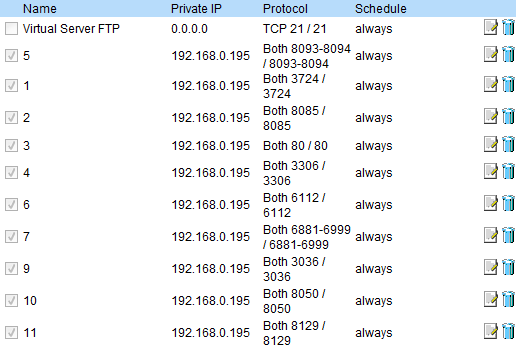
My ports that I forwarded (On a D-Link Wireless router (DI-524)):Code:host = 'bloodknights.kicks-ass.org'; //MySQL Host user = 'root'; //MySQL Username pass = 'root'; //MySQL Password dbname = 'accounts'; //Database Name





Shout-Out
- GaoStaff The Seven Deadly Sins Origin Cheat✅ [ESP,/Speed hack/Teleport]]
- CSMacro CS2 No Recoil Macro 2026 – Undetected 🛡️ | Auto Weapon Detection | All Mouse Support 🖱️
- Cheesydip #1 Marathon Cheat | Undetected |
- Cheesydip #1 Valorant Cheat | Undetected |
- Cheesydip #1 Arc Raiders Cheat | Undetected |
- syruppy Maple Syrup - MapleStory Idle RPG Hack
User Tag List
Results 1 to 15 of 16
-
12-07-2007 #1
 Active Member

- Reputation
- 42
- Join Date
- Mar 2007
- Posts
- 193
- Thanks G/R
- 0/1
- Trade Feedback
- 0 (0%)
- Mentioned
- 0 Post(s)
- Tagged
- 0 Thread(s)
Please help me get my server public
Last edited by faxmunky; 12-08-2007 at 01:07 AM.

-
12-07-2007 #2
 Contributor


- Reputation
- 154
- Join Date
- Mar 2007
- Posts
- 378
- Thanks G/R
- 2/3
- Trade Feedback
- 0 (0%)
- Mentioned
- 0 Post(s)
- Tagged
- 0 Thread(s)
you didnt forward your UDP ports. You currently have TCP only
Last edited by Matis02; 12-07-2007 at 08:49 PM.

-
12-07-2007 #3
Member
- Reputation
- 8
- Join Date
- Aug 2007
- Posts
- 102
- Thanks G/R
- 0/0
- Trade Feedback
- 0 (0%)
- Mentioned
- 0 Post(s)
- Tagged
- 0 Thread(s)
Problem is your Hosts.file
go to WhatIsMyIP.com nad add that to it....
also....open cmd prompt and type ipconfig and type that on into it

add the ip on whatismyip.com to it..followed by the you site....
then add your ip form cmd prompt to it alsoLast edited by quickx; 12-07-2007 at 08:55 PM.
-
12-08-2007 #4
Active Member
- Reputation
- 42
- Join Date
- Mar 2007
- Posts
- 193
- Thanks G/R
- 0/1
- Trade Feedback
- 0 (0%)
- Mentioned
- 0 Post(s)
- Tagged
- 0 Thread(s)
Okay, done all that... Can someone please check if this website works?
http://bloodknights.kicks-ass.org/site
-
12-08-2007 #5
Active Member
- Reputation
- 45
- Join Date
- Jun 2007
- Posts
- 807
- Thanks G/R
- 0/0
- Trade Feedback
- 0 (0%)
- Mentioned
- 0 Post(s)
- Tagged
- 0 Thread(s)

it doesnt work =(
-
12-08-2007 #6
Active Member
- Reputation
- 42
- Join Date
- Mar 2007
- Posts
- 193
- Thanks G/R
- 0/1
- Trade Feedback
- 0 (0%)
- Mentioned
- 0 Post(s)
- Tagged
- 0 Thread(s)
Anyone know what to do? All my new info is above...
I NEED SERIOUS HELP!!
-
12-08-2007 #7
Banned
- Reputation
- 244
- Join Date
- Jul 2007
- Posts
- 2,251
- Thanks G/R
- 0/1
- Trade Feedback
- 0 (0%)
- Mentioned
- 0 Post(s)
- Tagged
- 0 Thread(s)
Ahh, Don't use norwegian Elite Repack, it has to many Buggs, most Servers
Wont even start, try Ac-Web Repack 7.3
-
12-08-2007 #8
Active Member
- Reputation
- 42
- Join Date
- Mar 2007
- Posts
- 193
- Thanks G/R
- 0/1
- Trade Feedback
- 0 (0%)
- Mentioned
- 0 Post(s)
- Tagged
- 0 Thread(s)
kk... but whatabout the website?? It's JulianX... Why isnt it working?
-
12-08-2007 #9
Banned
- Reputation
- 244
- Join Date
- Jul 2007
- Posts
- 2,251
- Thanks G/R
- 0/1
- Trade Feedback
- 0 (0%)
- Mentioned
- 0 Post(s)
- Tagged
- 0 Thread(s)
That would be something with Ports or something wrong in Configs
-
12-08-2007 #10
Active Member
- Reputation
- 42
- Join Date
- Mar 2007
- Posts
- 193
- Thanks G/R
- 0/1
- Trade Feedback
- 0 (0%)
- Mentioned
- 0 Post(s)
- Tagged
- 0 Thread(s)
Could you please tell me what's wrong with my ports/configs? I've put in the config for the website. If theres any other configs I might need to fix up Im happy to add them to the list.Originally Posted by Illidan1
-
12-08-2007 #11
( ͡° ͜ʖ ͡°)

- Reputation
- 444
- Join Date
- Nov 2007
- Posts
- 1,591
- Thanks G/R
- 7/5
- Trade Feedback
- 0 (0%)
- Mentioned
- 0 Post(s)
- Tagged
- 0 Thread(s)

Make sure you open up the right ports on your router or no oone can get in to your computer.
-
12-08-2007 #12
Banned
- Reputation
- 40
- Join Date
- Jun 2007
- Posts
- 804
- Thanks G/R
- 0/0
- Trade Feedback
- 0 (0%)
- Mentioned
- 0 Post(s)
- Tagged
- 0 Thread(s)

Okay, You have forgot to open port 80-80 ! That one is very important!
GooD Luck, And a tips is to start with AC Web Ultimate 7.3 then empty "ascent" and then use Norwegian Elite!
Also on DB's like
Use Localhost, Cause that will be automathicly forwarded to bloodknights.kicks-ass.org<LogonDatabase Hostname = "bloodknights.kicks-ass.org"
Username = "root"
Password = "root"
Name = "accounts"
Port = "3306"
Type = "1">
So... Should be like this
<LogonDatabase Hostname = "localhost"
Username = "root"
Password = "root"
Name = "accounts"
Port = "3306"
Type = "1">Last edited by Succy; 12-08-2007 at 08:20 AM. Reason: Edit
-
12-08-2007 #13
Member
- Reputation
- 43
- Join Date
- Sep 2007
- Posts
- 217
- Thanks G/R
- 0/0
- Trade Feedback
- 0 (0%)
- Mentioned
- 0 Post(s)
- Tagged
- 0 Thread(s)
Norwegian elite repack,works good to me.Originally Posted by Illidan1
havent seen so many buggs.
-
12-08-2007 #14
Member
- Reputation
- 11
- Join Date
- Nov 2007
- Posts
- 156
- Thanks G/R
- 0/0
- Trade Feedback
- 0 (0%)
- Mentioned
- 0 Post(s)
- Tagged
- 0 Thread(s)
Hmm most internet providers block port 80 from being open so you cant run stuff like this... tell me what internet provider you have cuz i know verison blocks its... if you have verison tell me and i know a way to get around port 80 and use a different port for your web host.
-
12-08-2007 #15
Active Member
- Reputation
- 42
- Join Date
- Mar 2007
- Posts
- 193
- Thanks G/R
- 0/1
- Trade Feedback
- 0 (0%)
- Mentioned
- 0 Post(s)
- Tagged
- 0 Thread(s)
AAPT!!
 Thats my internet provider.. btew i've already forwardrd port 80.. I dont think I actually forwarded my ports correctly so i'll try making firewall rules with them on my router. I was doing something like virtual server. but theres no portforwarding page... My service provider told me that forwarding ports works within firewall rules on the router so i'll try that now.
Last edited by faxmunky; 12-08-2007 at 05:19 PM.

 Reply With Quote
Similar Threads
-
[ArcEmu] Need help to get my server Public!
By QreKing in forum WoW EMU Questions & RequestsReplies: 1Last Post: 09-24-2010, 01:56 PM -
[ArcEmu] Problem to get my server public! please help! without hamachi!
By hedlund666 in forum WoW EMU Questions & RequestsReplies: 3Last Post: 07-25-2010, 05:13 PM -
Please Help! Can't make server public!
By Monarch in forum World of Warcraft Emulator ServersReplies: 16Last Post: 07-05-2008, 06:23 PM -
Is my computer stuffed or not? Why can't I get my server public.. Please help! :(
By faxmunky in forum World of Warcraft Emulator ServersReplies: 5Last Post: 04-20-2008, 06:18 AM -
[ASCENT] please help me making my server public, configs inside!
By vak in forum World of Warcraft Emulator ServersReplies: 10Last Post: 10-05-2007, 02:25 PM
-
OwnedCore Forums
casino news World of Warcraft Pokemon GO MMO Overwatch RTS Casino reviews bc game bc game -
casino
Casino Gambling Online casinos Casino en ligne bc game lovable vercel bc game stake thrill Casino reviews Bitcoin casino Lucky8 1xbit heycasino -
CoreCoins
CoreCoins CoreCoins FAQ Shout-Out Banner Ads -
My OwnedCore
My Profile Notifications Settings Buy CoreCoins About Us


Privacy Policy | Cookie Policy | Terms | Contact Us
Available Payment Methods:-



-
Casino
stake